
Using Java and Python simultaneously

Hi friends,                                                                                                                    

               Firstly, I would like to thank you all for your love and support towards our blog.
                  We here are happy to know that our previous posts on tutorials and mini projects have helped you a great deal.

        So far many of you might have done some really amazing projects using a particular programming language. But in this post of mine, I would like to share with you my mini project for which I have collaborated two of the most amazing programming languages for this project of mine!
   
       Yes! You have read it right! In this project of mine, I have combined Python and Java programming languages.

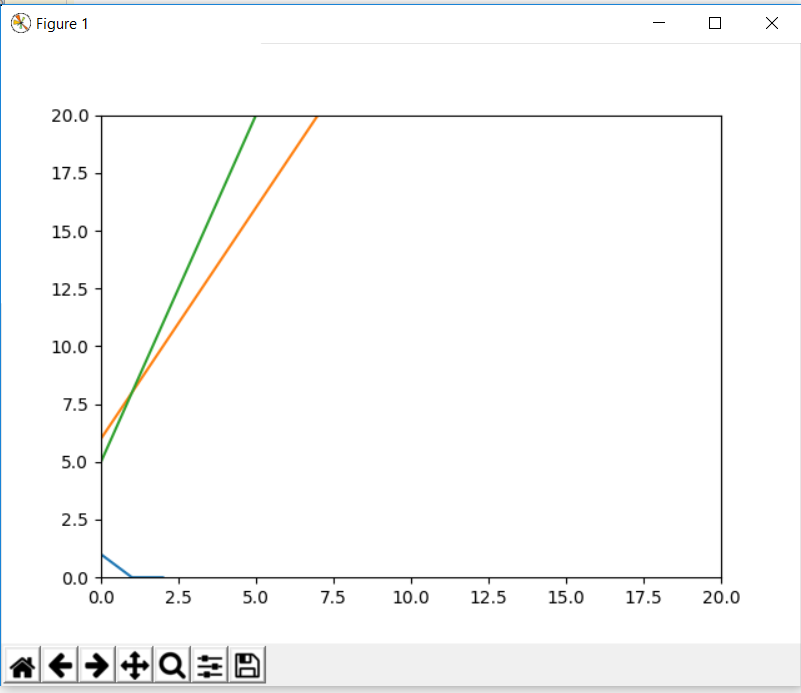
       The main agenda of this project is to combine the two programming languages, which are indirectly dependent on each other. By the way, this project takes input from the user in the form of a JFrame and plots a graph of the linear equations.

      
      We know that Python has a library called Tkinter which allows us to create forms and implement Graphical User Interface (GUI) programming. Impressive as it may sound, the interface isn't as beautiful, flexible, structured and easy as Java.

     Hence I've decided to implement the Java as front end to accept the user input for the linear equations and Python as a scripting language for back end to plot the graphs!

     Here are the images when we run the programs. (The programs are run individually and independently from each other).

The Java front end to receive input from the user of the linear equations:


The Python back end to plot the graphs of the received input from the user:


I hope you liked this project. 

Please follow, comment and subscribe our blog.

                                   Please contact us at technopedia13@gmail.com for the source code with detailed explanation of the project with the project code HB101.

Thank you very much :) :D Love you all!


Keep Coding!!

Comments

  1. If you dont mind, can you post the body of program .(entire program )

    ReplyDelete
    Replies
    1. We are preparing a gist which contains the codes of all our programs. We'll post the link once its ready.

      Delete

Post a Comment

Popular posts from this blog

Kotlin :A New Beginning

Hello guys, You might have heard about a new language supported for the android Officially by Google,Named as Kotlin. Kotlin is a statically typed Programming language.By statically typed language i mean that the type checking is done during complile time. It was developed in July 2011 by Jetbrains in Russia,In 2017 Google declared Kotlin as the official langauge for android. However the Traditional Java developers are sticking to java. New programmers who want to make android apps,Web apps can use Kotlin as a language of preference. With this Post i welcome you to the world of Kotlin. There is no good book for kotlin but there is the official documentation on Kotlin.I refer the official Kotlin documentation. The main aim of this post if to Introduce you Kotlin and its Uses and also how to write programs in Kotlin. The official documentation can be found on the website   KOTLIN I belive that this post will help you to write codes in Kotlin. So lets begin Fir...

Introduction to Web

Hello everybody,I would like to begin this topic by giving you some idea about "what is web development?" First of all,Let me tell you in simple words that "Web" and "Internet" are not the same.   Internet is the collection of computer's connected together in a network. It connects millions of computers together globally, forming a network in which any computer can communicate with any other computer as long as they are both connected to the  Internet . The World Wide Web (abbreviated  WWW  or the Web)  is  an information space where documents and other web resources are identified by Uniform Resource Locators (URLs), interlinked by hypertext links, and can be accessed via the Internet. Its very easy to learn website development and its very simple. Lets talk about the technologies used to develop a website and also lets get started with a few. There are a lot of languages to develop websites.In order to master all these languages what yo...

Web programming part 2

Hello guys, I am back with another post on web programming. In the last post you guys had learnt how to create a simple HTML document. As i told you there are many tags that you might have to remember. In this Post i will be creating a small Login form using only HTML. By using only HTML i mean No styling will be given to the document. The purpose of this code is to demonstrate you tags like <form> and <label> you will also learn how to make a button in HTML. The code goes like this: < form  action ="/action_page.php" >      < label > < b > Username < /b > < /label >      < input  type ="text"  placeholder ="Enter Username" >      < label > < b > Password < /b > < /label >      < input  type ="password"  placeholder ="Enter Password" >      < button  type ="submit" ...